Secure online exams for laptop classrooms.
Build an exam, share one link, auto-grade and review — with private in-browser proctoring. No invasive webcam, no student install. Free for your first 2 exams.
No student install · No card required
Three steps. No setup.
Build the exam
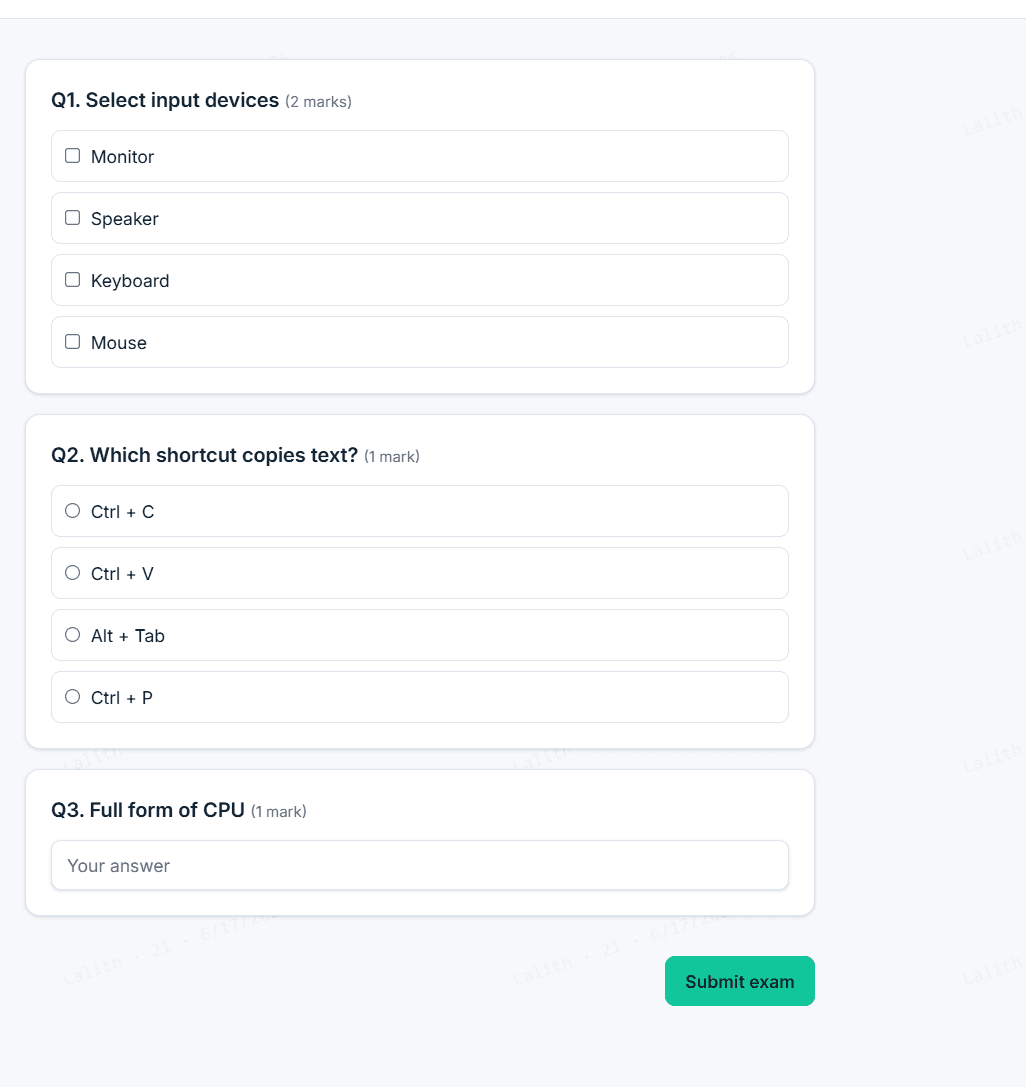
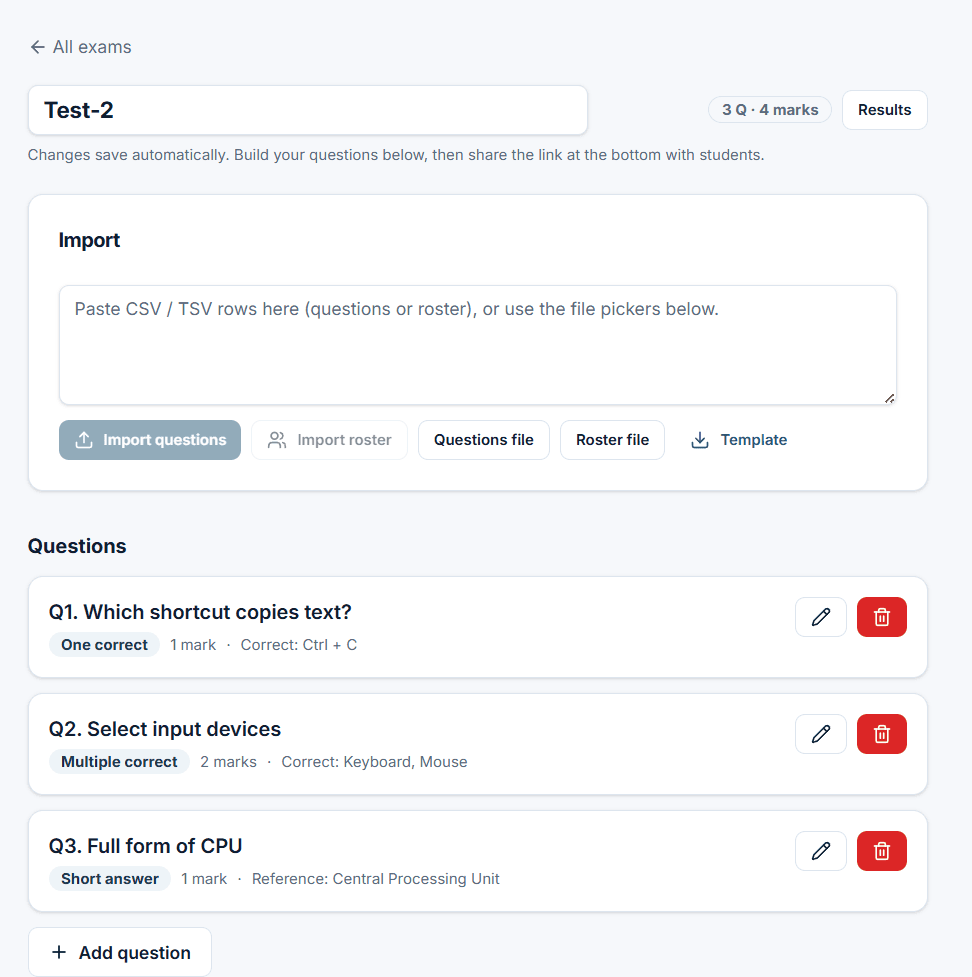
Add MCQ, checkbox, short or written questions — or import a CSV. Set shuffle, access code, and auto-submit rules.
Share one link
Send a single join link to your class group. No app, no student sign-up. Works on any laptop browser.
Auto-grade & review
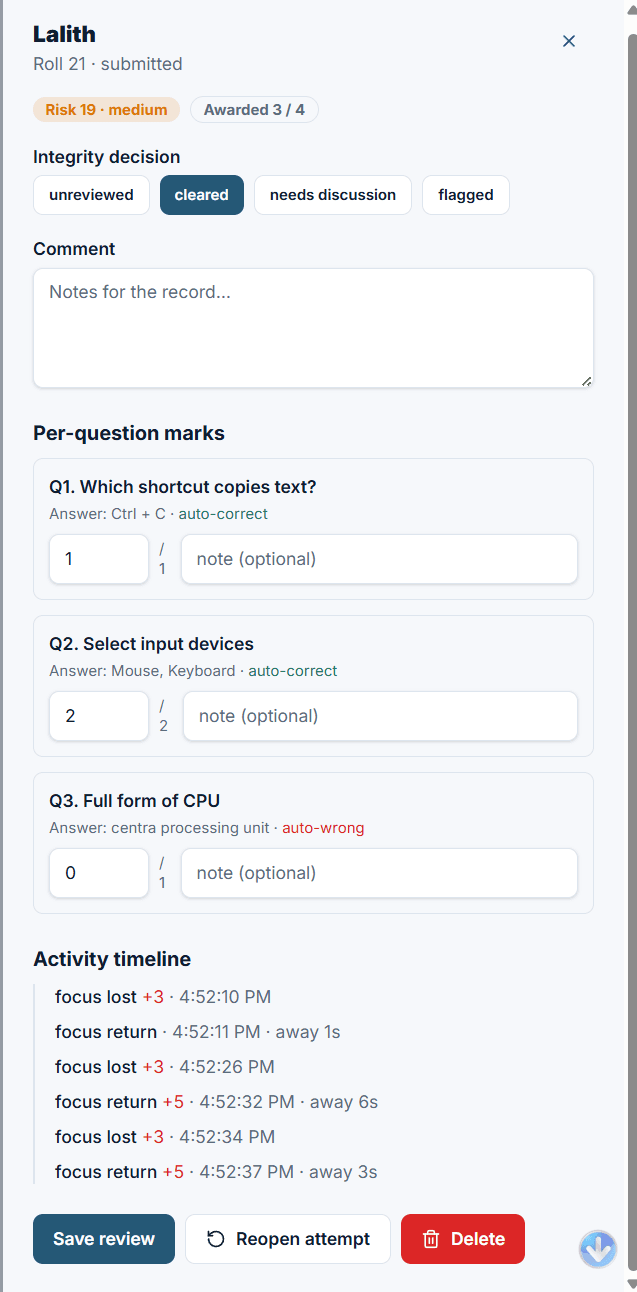
Options grade instantly; written answers go to a manual review queue with the integrity timeline beside them.
Everything an exam needs — nothing it doesn't.
Local-first & offline
Local mode stores exams and answers in the browser. Signing in enables cloud sync; shared cloud exams need an internet connection.
In-browser proctoring
Risk scoring on tab-switch, copy, right-click, screenshot and devtools — with a live integrity timeline per student.
Traceable watermark
Every screen is tiled with the student's name, roll and date, so any leaked screenshot or photo points straight back to the source.
Fair grading
Only option questions auto-mark. Written answers are always reviewed by you — no student loses marks to a spelling variation.
Review queue
Clear, flag or reopen attempts. Bulk-clear low-risk ones. Award per-question marks with notes for the record.
Import / export
Bring questions and rosters in from CSV, export results back out. No lock-in — your data is yours.
Private because it's local.
Use local mode to keep exam data in your browser. Signing in enables cloud sync, including on Free; students using cloud links send their answers to our backend. Self-hosting lets your school manage where that data is stored.
Start free. Upgrade for unlimited exams.
Prices in INR. Cancel anytime.
Free
Everything to run real exams
- 2 exams included
- Full in-browser proctoring
- Auto-grade + manual review
- CSV import / export
- Shareable links — no student install
Pro
Unlimited exams, no limits
Sign in to your dashboard, then upgrade in one click — secure Razorpay checkout, instant activation.
- Unlimited exams
- Everything in Free
- Cloud sync across devices
- Real-time submissions dashboard
- Remote students, any network
School
Institution-wide or self-hosted
- Everything in Pro
- Unlimited teachers
- Self-host on campus (data never leaves)
- Priority support
- Onboarding & training
Questions, answered honestly.
Do students need to install anything?
No. They open one link in any laptop browser, enter their name and roll number, and start. Nothing to download.
Is it really private?
Local mode keeps exam data on your device. Signing in enables cloud sync on both Free and paid plans; students using cloud links send their answers to our backend. ExamGuard uses no webcam, microphone or biometrics. Schools can self-host.
Can it stop cheating completely?
No tool can, and we won't pretend. Browser proctoring is best-effort: it scores risky behaviour and watermarks every screen so leaks are traceable. It raises the cost of cheating, honestly.
How are written answers graded?
Only option questions are auto-marked. Short and written answers always go to you for manual review, so phrasing or spelling never costs a student marks unfairly.
Is there online exam software without webcam proctoring?
Yes. ExamGuard Online is online exam software without webcam proctoring — no camera, microphone or face recognition. Instead it scores risky behaviour (tab-switch, copy/paste, screenshot) and tiles an identity watermark over every screen so leaks are traceable. Students take it in any laptop browser from one shared link.
What is the best no-webcam online exam tool for coaching centres in India?
ExamGuard Online is built for Indian coaching centres that test weekly: one shareable link with no student install, auto-grading, INR pricing (free tier, then ₹299/month), and honest in-browser proctoring with no webcam or biometrics. It works offline and can be self-hosted so data stays on campus.
Is ExamGuard a free, private alternative to ProctorU and Honorlock?
Yes. ExamGuard Online is a privacy-first alternative to webcam proctors like ProctorU, Honorlock and Proctorio. The local tier is free and keeps everything in the teacher's browser; there is no webcam surveillance, no recording and no biometric analysis — only behaviour risk scoring and an identity watermark.
Run your next exam in minutes.
Free, local-first, no student install. Upgrade only when you need the cloud.
Create an exam free